How a Simple Event Tool Evolved into an Integration-Driven SaaS Platform
How a Simple Event Tool Evolved into an Integration-Driven SaaS Platform
Many software projects start with a simple idea.
In this case, the goal was straightforward: build a tool to manage online events, registrations, and reminders.
But as real users began interacting with the platform and integrations were introduced, the architecture evolved significantly.
What started as a basic event workflow gradually became a system responsible for orchestrating multiple external services, automation processes, and operational workflows.
This article shares architectural lessons from building that system and how a simple tool evolved into an integration-driven SaaS platform.
The Initial Concept
At the beginning, the system architecture was simple and easy to reason about.
Users could browse events, register, and receive confirmation emails.
The architecture looked something like this:
Participants
↓
Frontend Web Application
↓
Backend Application
↓
Database
↓
Email Service + Video Meeting Platform
Before Architecture

At this stage the platform handled:
• Event registration • Confirmation emails • Basic event management
The system was small, easy to maintain, and the architecture was straightforward.
But as the product grew, new requirements started appearing.
When Complexity Appears
As the platform began supporting more use cases, the architecture needed to evolve.
New requirements included:
• Multi-session events • Global users across multiple time zones • Automated reminders • Analytics and reporting • Integration with external services • Operational monitoring
Each new capability introduced additional complexity.
What started as a simple application gradually transformed into a coordination platform between multiple systems.
The Production Architecture
In production, the system evolved into a layered architecture designed to handle integrations, automation, and operational workflows reliably.
Full Platform Architecture

The architecture can be understood through several layers.
Users
The platform serves multiple types of users:
• Participants attending events • Event Leads / Admins managing events • Operations teams monitoring and maintaining the system
Each interacts with the system through the web application.
Application Layer
The frontend web application provides the user interface.
This layer handles:
• Event browsing • Registration forms • Admin dashboards • Event management tools • Analytics views
It communicates with the platform through secure APIs.
Core Platform (Orchestration Layer)
This is the heart of the system.
Instead of rebuilding every capability internally, the platform focuses on orchestrating workflows between different services.
Core responsibilities include:
• Event orchestration • Registration management • Reminder scheduling • Integration coordination • Administrative workflows • System observability
Key internal components include:
• Event Management Engine • Registration Engine • Reminder Scheduler • Integration Manager • Observability Layer
Data Layer
The database stores operational data such as:
• Events • Sessions • Registrations • Attendance records • Reminder logs • System logs • Audit trails
The data layer also supports:
• Idempotency controls • Operational dashboards • Debugging production incidents
External Integrations
Rather than rebuilding specialized capabilities, the platform integrates with external services such as:
• Video meeting platforms • Email delivery infrastructure • Marketing automation tools • AI services • Analytics platforms • Calendar ecosystems
These integrations are handled through translation layers so external APIs never dictate the internal system architecture.
Automation Layer
Background automation ensures the system operates reliably.
These processes include:
• Scheduled reminder processing • Attendance synchronization • Data synchronization with external systems • Operational automation tasks
Automation runs periodically and evaluates system state rather than relying solely on delayed job queues.
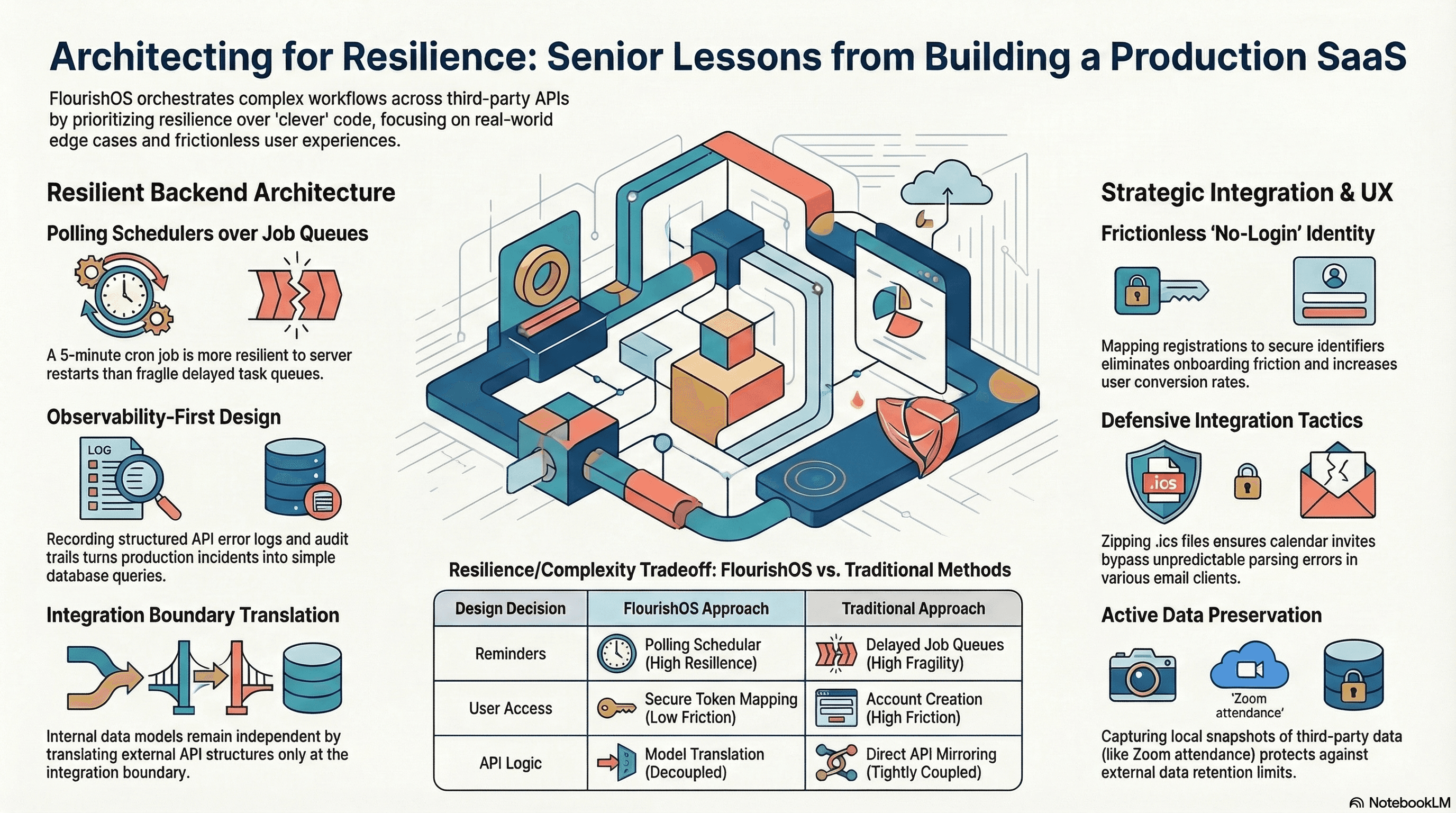
Architectural Decisions That Made the System Reliable
During development, a few architectural decisions significantly improved system reliability and usability.
Architectural Blueprint

Frictionless Access Architecture
Participants do not need user accounts to attend events.
Instead, registrations are mapped to secure identifiers.
Advantages include:
• Reduced onboarding friction • Faster user adoption • Simpler user experience
The tradeoff is that the backend must manage identity mapping and access control carefully.
Polling Schedulers Instead of Delayed Job Queues
Rather than scheduling thousands of delayed tasks, the system periodically evaluates what actions need to run.
Benefits include:
• Higher reliability • Simpler debugging • Reduced operational complexity
Although this approach sacrifices some scheduling precision, it significantly improves system resilience.
API Boundary Translation
External APIs should never dictate internal architecture.
Instead, the platform maintains its own internal data model and translates it when interacting with external services.
Advantages include:
• Reduced coupling with third-party systems • Easier provider changes • Cleaner domain logic
Observability-First Design
Operational visibility was built directly into the system.
Structured logs capture events such as:
• Email delivery attempts • Reminder processing • External API failures • Administrative actions
This makes debugging production issues significantly easier.
Instead of searching through logs, many operational questions can be answered through simple database queries.
Lessons Learned
Building this platform revealed several important lessons about designing modern SaaS systems.
• Simplicity often improves reliability • Integration design matters more than individual features • Observability should be built early in the architecture • External APIs introduce unpredictability that must be handled carefully • Removing friction for users often shifts complexity into backend workflows
Perhaps the most important insight was realizing that many modern SaaS platforms are less about building everything internally and more about orchestrating specialized services reliably.
Final Reflection
What started as a simple event registration tool eventually evolved into a system coordinating multiple services, workflows, and automation layers.
The experience reinforced a key principle of software architecture:
Good systems are not defined by their complexity, but by their ability to remain understandable and resilient as they grow.
Modern SaaS engineering is often less about writing code and more about designing reliable workflows between people, systems, and services.
Author Note
This article shares architectural lessons from building a production system. Specific implementation details and vendor choices have been intentionally generalized.